Browser use
Picks up where you left off — signed in as you.
Import your Chrome profile and Godmode continues your sessions: cookies, logins, open work. It browses the real web in a real Chromium, not a sandbox that gets flagged as a bot.
Godmode is an AI coworker that works like a person on a Mac. It opens your browser, signs in with your logins and 2FA, clicks through your apps and keeps going until the job is done — quietly in the background, or on its own Mac. No workflows to build. No integrations to wire up. Just tell it what you need.
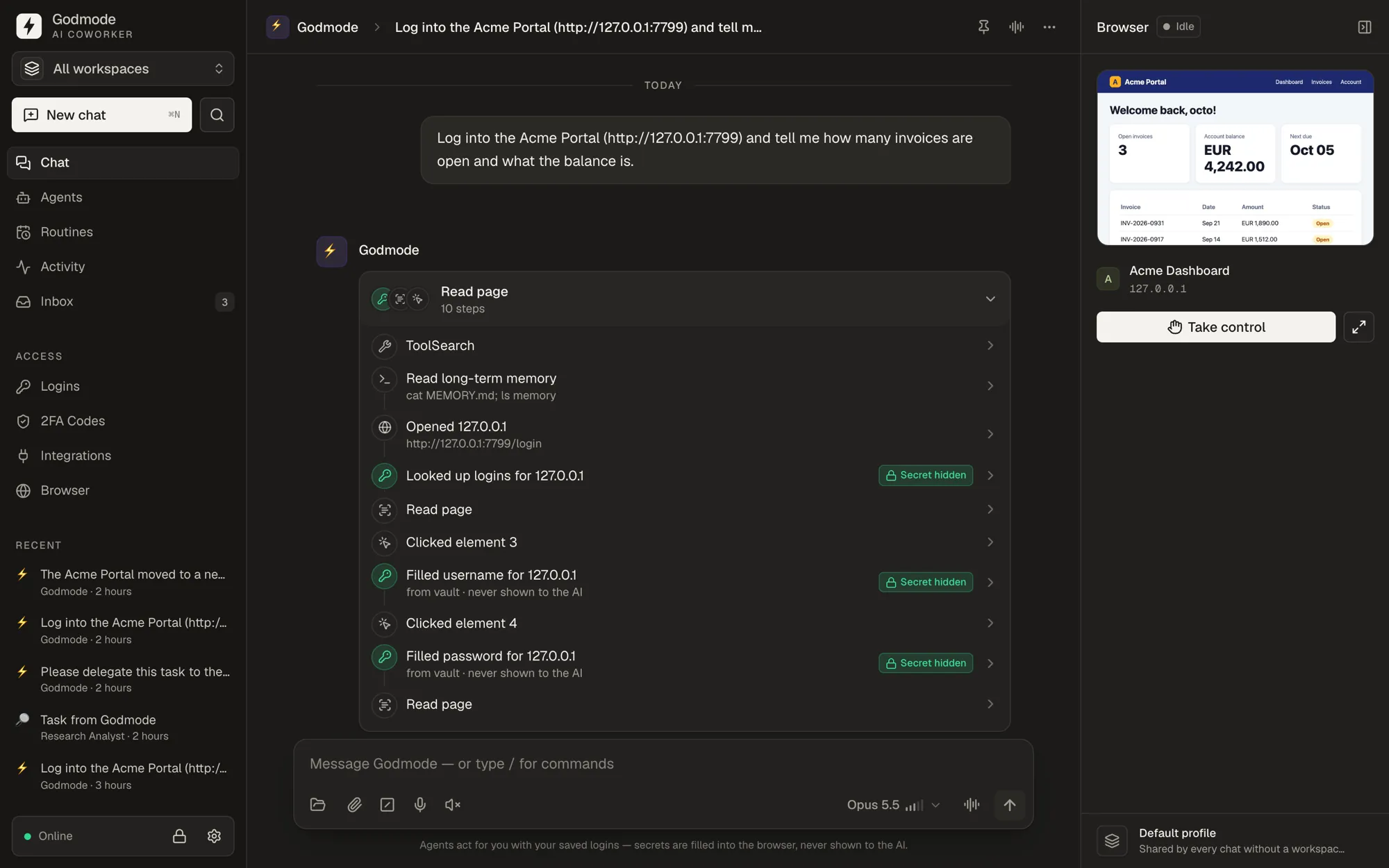
● Monday, 08:00 — before you’re up
If it runs in a browser or on a Mac, Godmode can use it — no integration required.
01 Why this exists
I run a software company. For years I tried every way to automate the busywork — Zapier flows, RPA bots, MCP servers, AI agents that gave up the moment a login screen appeared. None of them worked the way a person does.
So we built one that does. Godmode uses a computer like my team does: it opens the browser, signs in, clicks through the tools and finishes the job. It now does the repetitive work at my company while we focus on the work only humans can do. I can’t imagine going back.
They’ll write the email. They won’t sign into your supplier portal, grab the invoice and file it.
MCP servers, API keys, Zapier flows — every tool needs its own connector, and half of yours don’t have one.
They run in someone else’s browser, without your sessions, cookies or 2FA — and get blocked as bots.
Godmode takes the human route: a real browser with your sessions, your apps, your Mac. If you can do it on a computer, Godmode can too.
02 What it can do
The best parts of today’s AI agents — browser use, computer use, memory, automations, chat apps — in one app that runs on your device, with your access.
Import your Chrome profile and Godmode continues your sessions: cookies, logins, open work. It browses the real web in a real Chromium, not a sandbox that gets flagged as a bot.
Share a window and Godmode clicks and types into it behind the scenes — even when it’s covered. Keep working, or go to bed.
One click spins up an isolated macOS VM on your device. The agent installs, runs and breaks things in there — your Mac stays untouched.
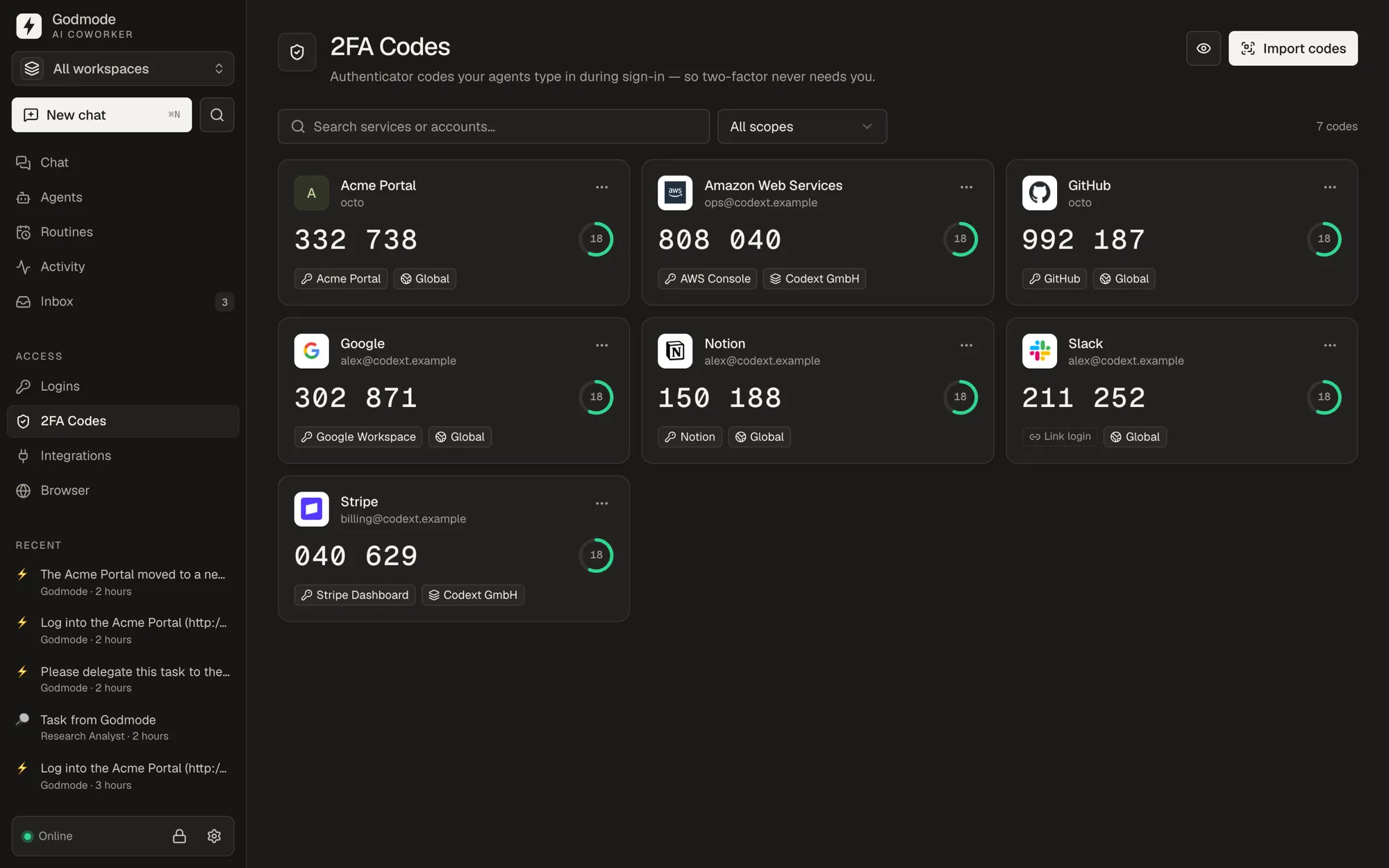
Passwords and 2FA codes live in an encrypted vault on your device. Godmode types them into the page for the agent — the model only ever sees [secret hidden]. Import from Chrome, 1Password, Bitwarden or a Google Authenticator QR screenshot.
Persistent agents with their own instructions, memory and history, each in its own git repo. At night they review their day and tidy up what they learned.
On a schedule, when an email arrives, when a webhook fires — or when something you describe in plain words becomes true.
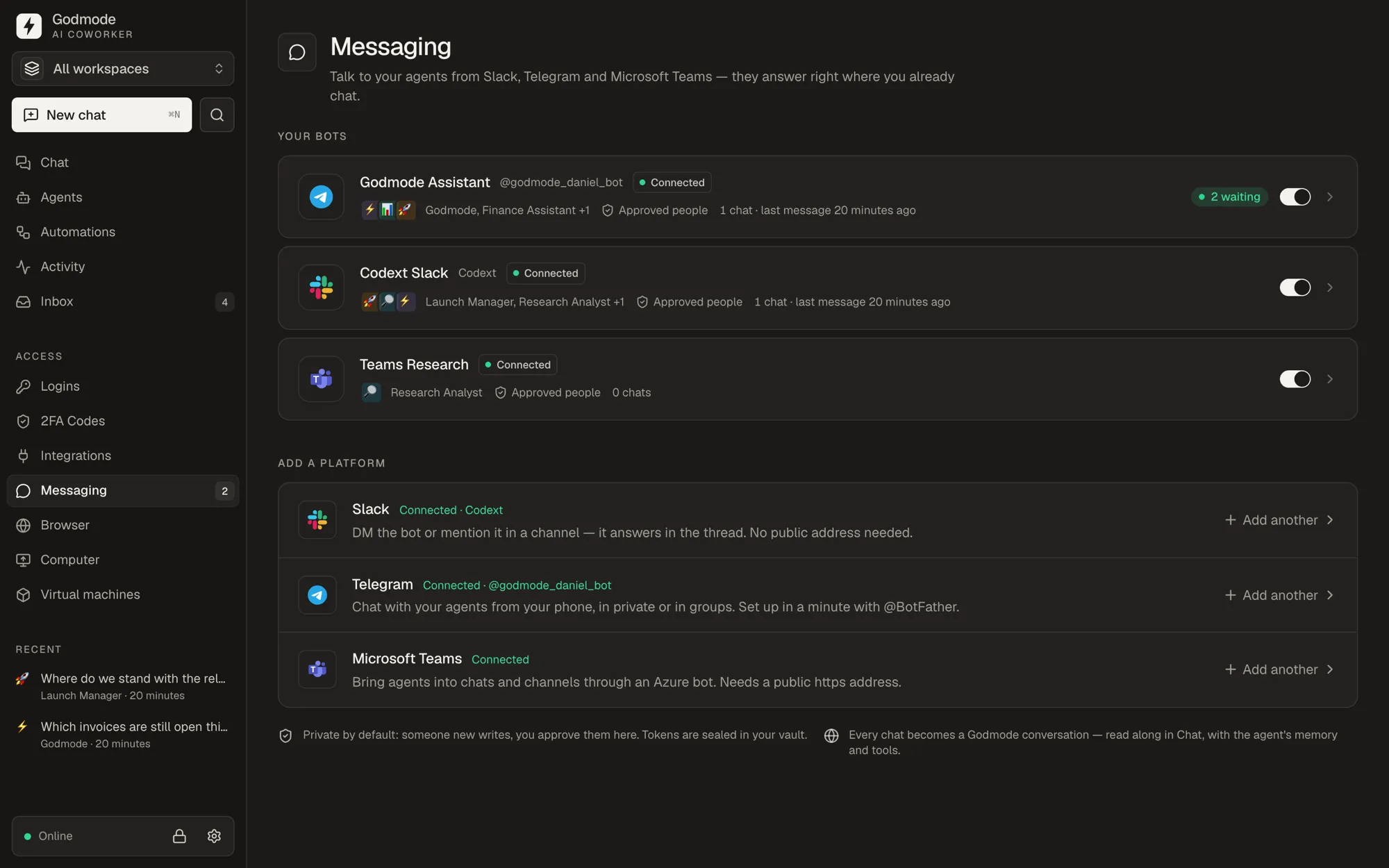
Talk to your agents from Slack, Telegram or Microsoft Teams — or just speak to it.
Agents hand tasks to each other and spin up helpers for side quests. Ask the main agent to create, check or reconfigure any of them — in plain words.
Hundreds of apps via Composio and any MCP server — optional speed-ups on top of an agent that can simply use the app like you would.
03 See it work
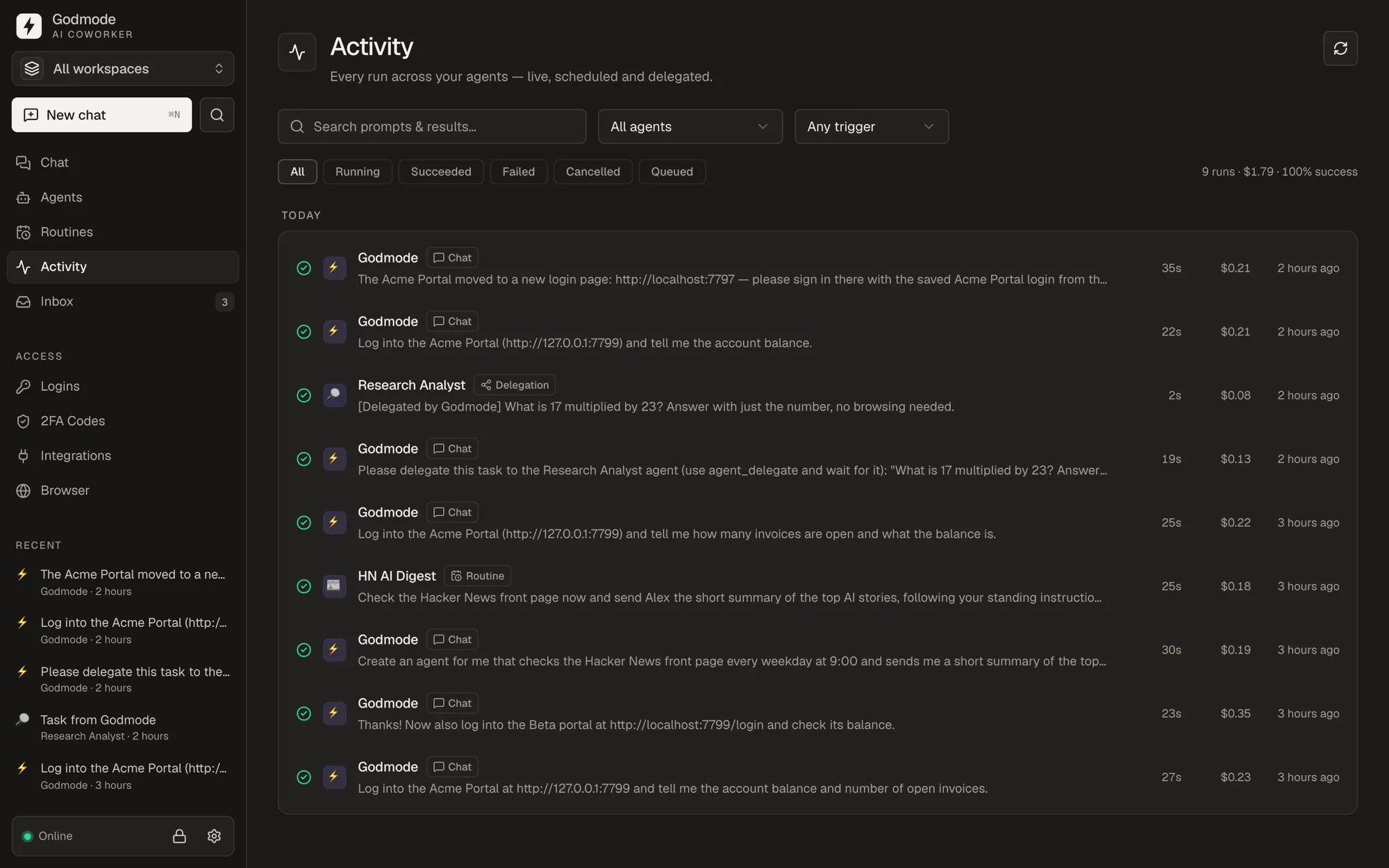
Every step is visible and every run is logged. Jump in with one click, or let it finish on its own.
Its own Mac
An isolated macOS VM on your device. The agent works inside; your Mac stays untouched.
In the background
It clicks and types in a covered window while your cursor does its own thing.
Fill, don’t reveal
Passwords and 2FA codes are typed into the page. The model sees [secret hidden].
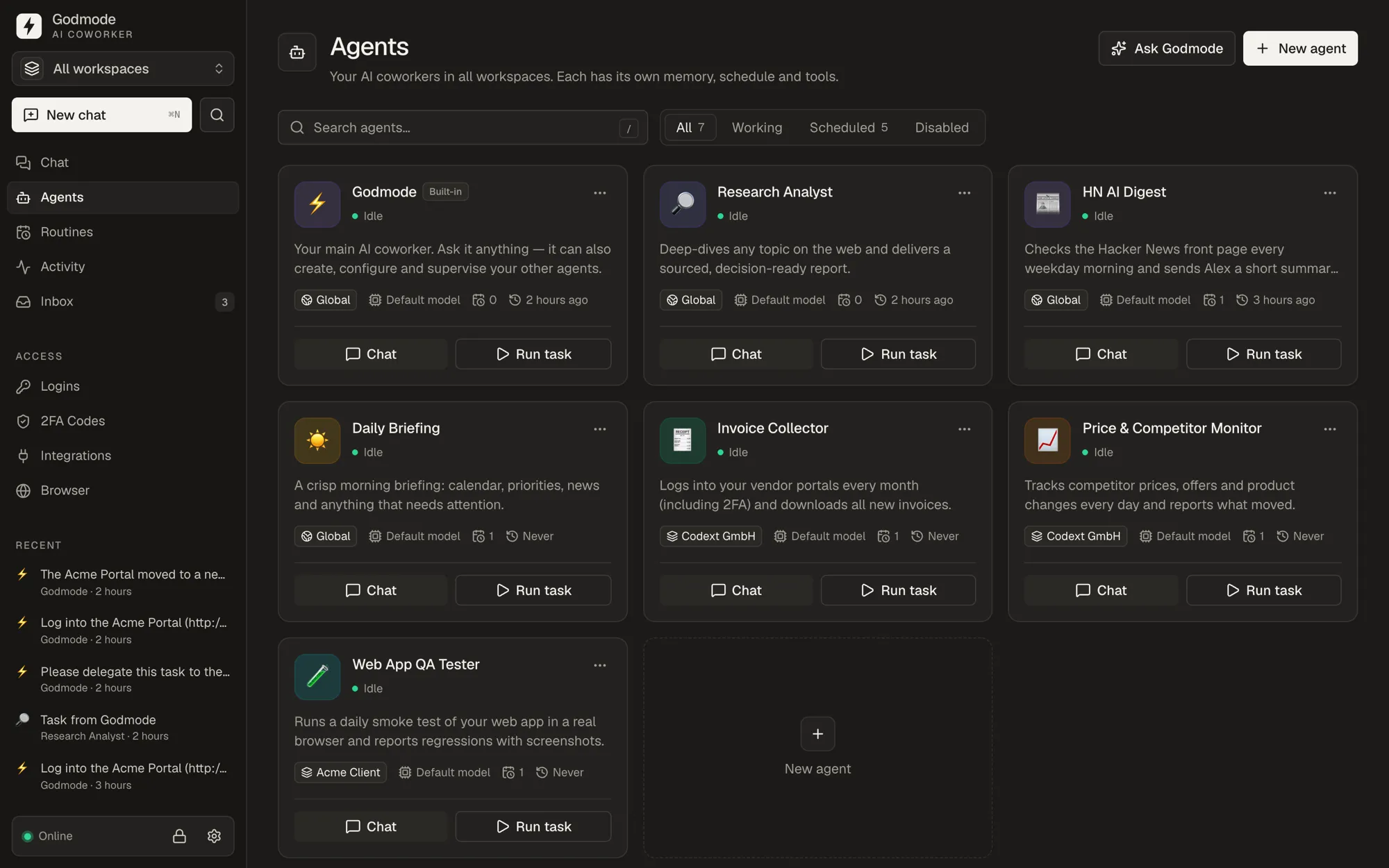
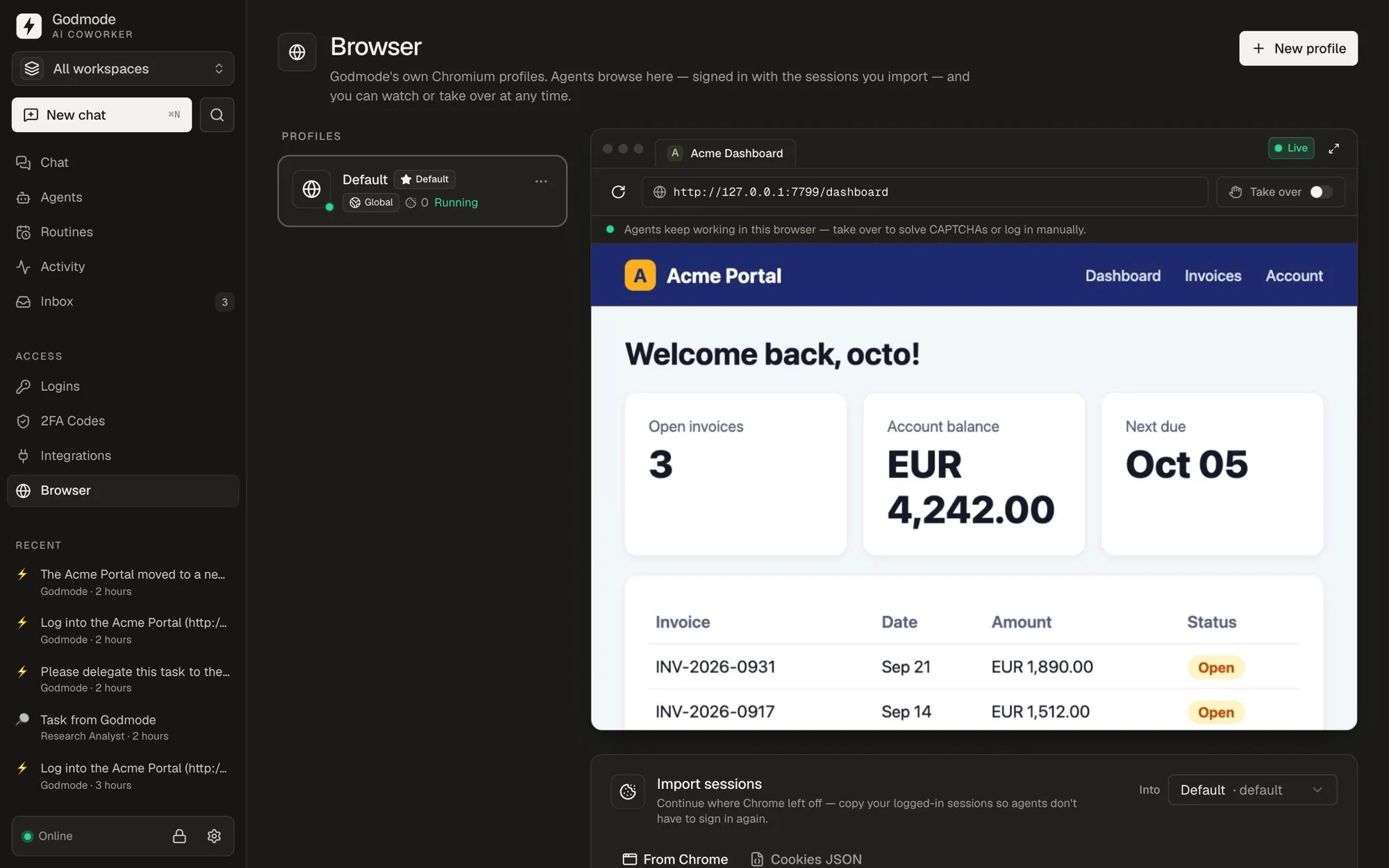
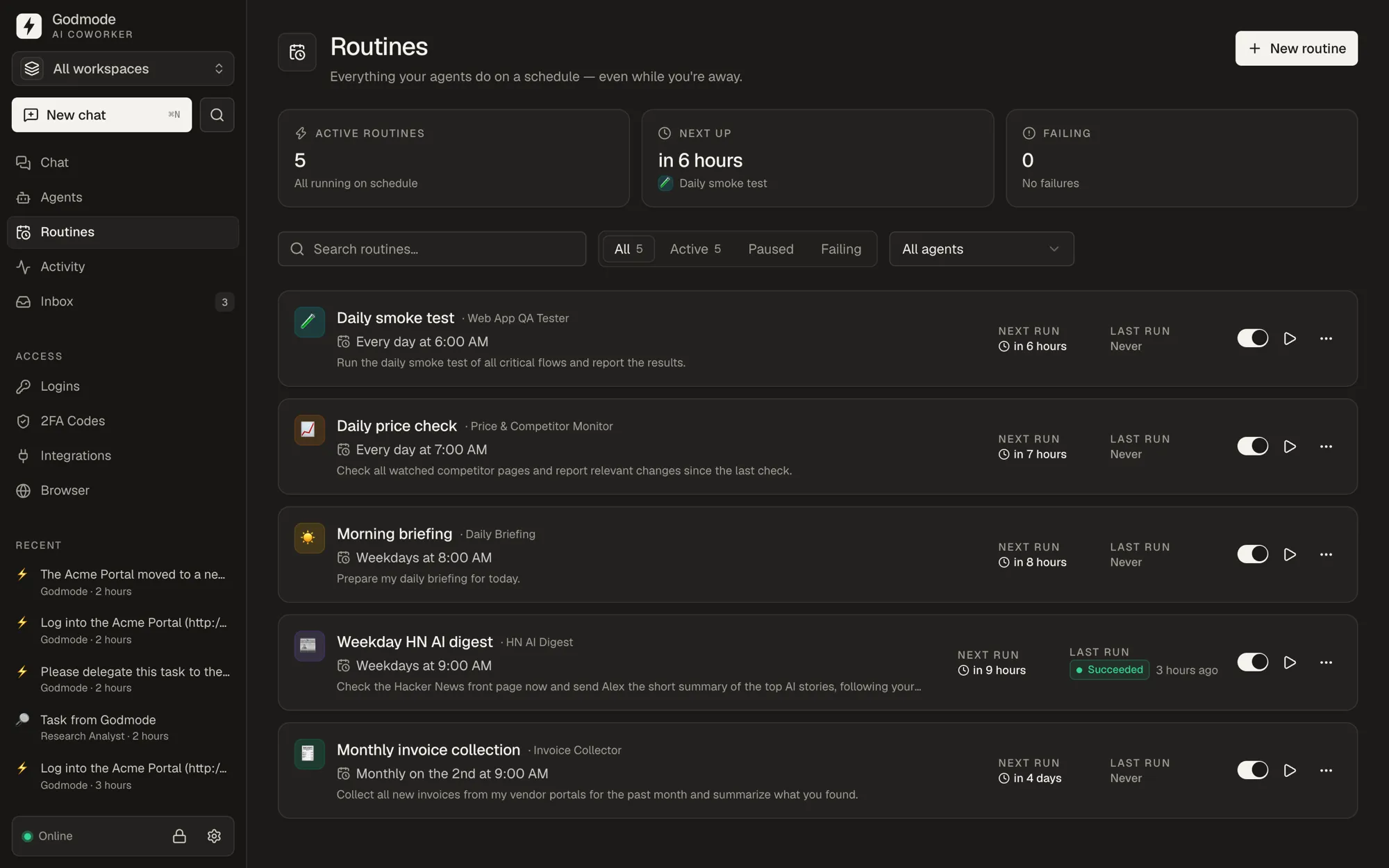
04 How it works
Download for macOS, Windows or Linux. Onboarding checks your system, installs what’s missing and connects your Claude account.
Import your Chrome profile, your passwords from Chrome or 1Password, and your 2FA codes from a QR screenshot. All encrypted, all on your device.
Chat with it, put it on a schedule, or message it from Slack. Watch it live, take control anytime — or don’t.
05 Use cases
Describe the work in a sentence. Godmode figures out the clicks — and the schedule.
Every Monday, log into our supplier portals, download the new invoices, match them to last week’s Stripe payouts and post a summary to #finance.
After each sales call in my calendar, update the deal in HubSpot, draft a follow-up in Gmail and ping me on Telegram if they haven’t replied in 3 days.
Pull this week’s spend and conversions from Meta, Google and X Ads, update our reporting sheet and flag every campaign with a CPA above $80.
Answer new Zendesk tickets about shipping using our help center, look up the order in Shopify, and escalate refunds over $200 to me.
In your Mac VM: clone the repo, reproduce the checkout bug from ticket #42, fix it, run the test suite and open a pull request.
Every morning, read my inbox, calendar and yesterday’s Stripe numbers, and send me a 5-line briefing on Telegram with what needs my attention.
Illustrative runs. Your agents work with the tools and accounts you give them.
06 Security
You’re handing an AI the keys to your business. So the keys stay on your device, encrypted — and in the browser the AI never gets to hold them.
What the model sees
In the browser, Godmode types passwords and 2FA codes into the page itself. The model only ever sees that a secret was filled.
A login is only ever filled into its own website, over https, into a real password field. Phishing and prompt-injected lookalikes get nothing.
AES-256-GCM envelope encryption with scrypt, keys in your OS keychain. Your vault, agents and history never touch our servers.
Give risky work its own macOS VM. Scope logins, folders and integrations per workspace, so each agent reaches only what it needs.
An audit log of every secret access. Known secrets are redacted from transcripts, logs and screens. Every run is committed to git.
Watch every step live. Take control with one click, stop any run instantly, and get told exactly which login is missing.
Plainly stated: agents run Claude Code with full permissions so they can finish without asking — treat them like a trusted coworker, and use a VM for sensitive work. Inside a VM the agent controls the whole machine, so signing in there is best effort and closer to revealing a password than to fill-only; it’s off until you allow it. Tasks and the pages the agent reads are processed by Claude under your own Anthropic account.
07 Compare
Grok Bot’s teammates, Dots’ own computer, OpenClaw’s local control, Hermes’ memory — plus a vault for passwords and 2FA codes that the model never sees. All in one app, running on your device.
Swipe to compare
| Feature | Godmode | Grok Bot | ChatGPT Dots | OpenClaw | Hermes Agent | Claude Cowork |
|---|---|---|---|---|---|---|
| Runs on your own device | Yes. Mac · Windows · Linux | No. Cloud computer | No. Cloud computer | Yes. Self-hosted | Yes. Self-hosted | Partly. Cloud by default |
| Its own computer | Yes. macOS VMs on your Mac | Partly. One cloud PC for all bots | Yes. Cloud computer | No. Sandbox off by default | Partly. Containers / remote | Partly. Fresh sandbox each session |
| Continues your browser sessions | Yes. Chrome profile import | No. Cloud browser | No. Cloud browser | Yes. Browser Relay | Not documented. | Yes. Claude in Chrome |
| Encrypted vault + 2FA, hidden from the model | Yes. AES-256-GCM · TOTP | Not documented. | Partly. Passwords; 2FA not stated | No. Not encrypted at rest | No. Display-only redaction | Not documented. |
| Persistent agents with memory | Yes. Versioned in git | Yes. | Yes. | Yes. | Yes. | Partly. Fresh per session |
| Automations & triggers | Yes. Schedules · events · webhooks | Yes. Routines | Yes. Scheduled tasks | Yes. Cron · webhooks | Yes. Scheduling | Yes. Scheduled tasks |
| Slack · Telegram · Teams | Yes. All three | Partly. Slack via plugins | Partly. Slack · Teams | Yes. 29+ channels | Partly. No Teams | Not documented. |
| Keeps working with your laptop shut | Partly. On an always-on machine | Yes. | Yes. | Partly. On a server | Partly. On a VPS | Yes. Cloud tasks |
| Model | Claude Opus 5.5 | Grok | GPT-6 Astra | Any | Any | Claude |
| Price | $500 once or $50/mo | $20–$40/mo, weekly cap | From $100/mo (Pro) | Free + model | Free + model | In Claude Pro / Max |
Based on each vendor’s public pages, docs and press coverage as of September 29, 2026. “?” means we couldn’t find it documented. Prices exclude taxes; Godmode also needs a Claude plan or an Anthropic API key. Spotted something out of date? Tell us and we’ll fix it. All trademarks belong to their owners.
08 The math
A full-time assistant in the US costs a median $76,590 a year. Godmode costs $500 once — about what that assistant earns in two days — and it works nights, weekends and holidays.
Assistant / year
$76,590
US median, BLS
Godmode, forever
$500
+ your Claude plan
And the gap grows every week: an agent’s memory and routines compound. The team that starts now has months of learned workflows by the time everyone else begins.
What is your busywork worth?
calculatorEstimate assumes Godmode takes over 70% of those hours across 48 working weeks. Your results depend on your tasks.
09 Pricing
Everything Godmode can do, in both plans. Pick how you want to pay.
Lifetime
Best value · launch offer$500 once
Pay once. Own it. Every update included.
Costs the same as 10 months of monthly — then it’s free forever.
Monthly
$50 / month
Everything in Godmode. Cancel anytime.
Start small. Switch to lifetime whenever you like.
14-day money-back guarantee. Not for you? Email us, get every cent back.
Runs on your Claude plan. Sign in with Claude Pro or Max, or use an Anthropic API key — not included. Details
Business-ready. Invoice with your VAT ID, paid securely via Stripe. Card, Apple Pay, Google Pay & more.
Lifetime is a launch offer. When it’s gone, it’s gone — licenses already sold stay valid forever.
Need it for a team? Talk to us.
The Godmode desktop app for macOS, Windows and Linux (plus the headless server with its web dashboard), a license key, and every feature on this page. Lifetime is a one-time payment with all future updates included. Monthly includes everything while you’re subscribed.
Yes. Godmode runs on Anthropic’s official Claude Code, so it thinks with Claude Opus 5.5 — and with every newer Claude model the day you get access. Sign in with a Claude Pro or Max plan, or add an Anthropic API key. For heavy automation, Max or an API key fits better than Pro. Anthropic has changed how subscriptions cover this kind of use before; if it happens again, an API key keeps working.
Your logins and 2FA secrets live in a vault on your device, encrypted with AES-256-GCM. In the browser, Godmode types them into the page itself — the model only learns that a secret was filled, never its value — and only into the login’s own website. Every access is logged. One honest exception: inside a macOS VM the agent controls the whole machine, so signing in there is best effort and off until you allow it.
Your vault, browser profiles, agents, memory, history and VMs stay on your device. Godmode has no telemetry and sends nothing to us. The tasks you give and the pages your agents read are processed by Claude under your own Anthropic account — exactly as when you use Claude Code directly.
Not when you share a window: Godmode clicks and types into it in the background, even when it’s covered, and your cursor stays yours. If you share a whole display it uses the real mouse (like screen-sharing with a person), and agents with their own VM work entirely inside it.
No. The app runs on macOS, Windows and Linux. Only the “own Mac” virtual machines need a Mac with Apple silicon (Apple allows two macOS VMs running at the same time). Browser use, the vault, agents, automations and chat apps work everywhere.
Not on that computer — Godmode works on your machine, which is the point. For 24/7 agents, run the headless server on an always-on Mac mini, PC or home server and use the web dashboard from anywhere.
It won’t solve CAPTCHAs — when one appears you click “Take control” and it carries on afterwards. Like any AI it can make mistakes, so review consequential work (payments, contracts, anything public) until you trust a routine.
Because your logins are worth protecting and your time is worth more than tinkering. Popular open-source agents store secrets unencrypted or show them to the model, and leave sandboxing off by default. Godmode is secure by default and point-and-click: encrypted vault with 2FA, isolated VMs, Chrome session import, a native app and automatic updates — ready in minutes.
Both run on the vendor’s cloud computer, so your cookies and logins live on their servers, behind plan limits they can change. Godmode runs on your device, with your sessions, and your price doesn’t change after you buy. The trade-off: cloud agents keep going with your laptop closed — for that, run Godmode on an always-on machine.
Email us within 14 days of buying and we’ll refund you in full — no questions, no forms. Monthly plans can be cancelled anytime and run until the end of the paid month.
Yes. Add your company name and VAT ID at checkout and you’ll get a proper invoice by email. Payments are handled by Stripe; we never see your card.
Hand it the busywork today. Tomorrow morning, it’s done — and your agent knows how you like it.
14-day money-back guarantee · secure checkout with Stripe
Ready-to-use prompts for finance, sales, marketing, support and ops — paste one into Godmode and it runs. We’ll also send you launch news, nothing else.